Laser Engravers · Research-based review
WeCreat Vision Pro 45W Super Review
An enclosed laser for a more organized workshop. The buying decision comes down to your projects, package contents and total setup cost.
The short answer
Worth a shortlist. Plan the complete setup.
Best suited to buyers with repeatable projects and a workshop ready for extraction. Confirm the Super package before paying for accessories you may not need.
Research-based editorial judgment. No direct-use measurements or customer-rating average.
Check Price on AmazonCheck the current price, seller and package contents on Amazon.
- Laser platform
- 45W diode
- Purchase option
- Super
- Software platform
- Windows / macOS
- Before ordering
- Verify bundle
As an Amazon Associate, Pickora earns from qualifying purchases.
A good fit if…
- You have defined engraving projects and suitable materials.
- You can plan extraction and confirm the complete package.
Think twice if…
- You need guaranteed output without a material demonstration.
- You are buying a bundle before knowing which accessories you need.
What you are buying
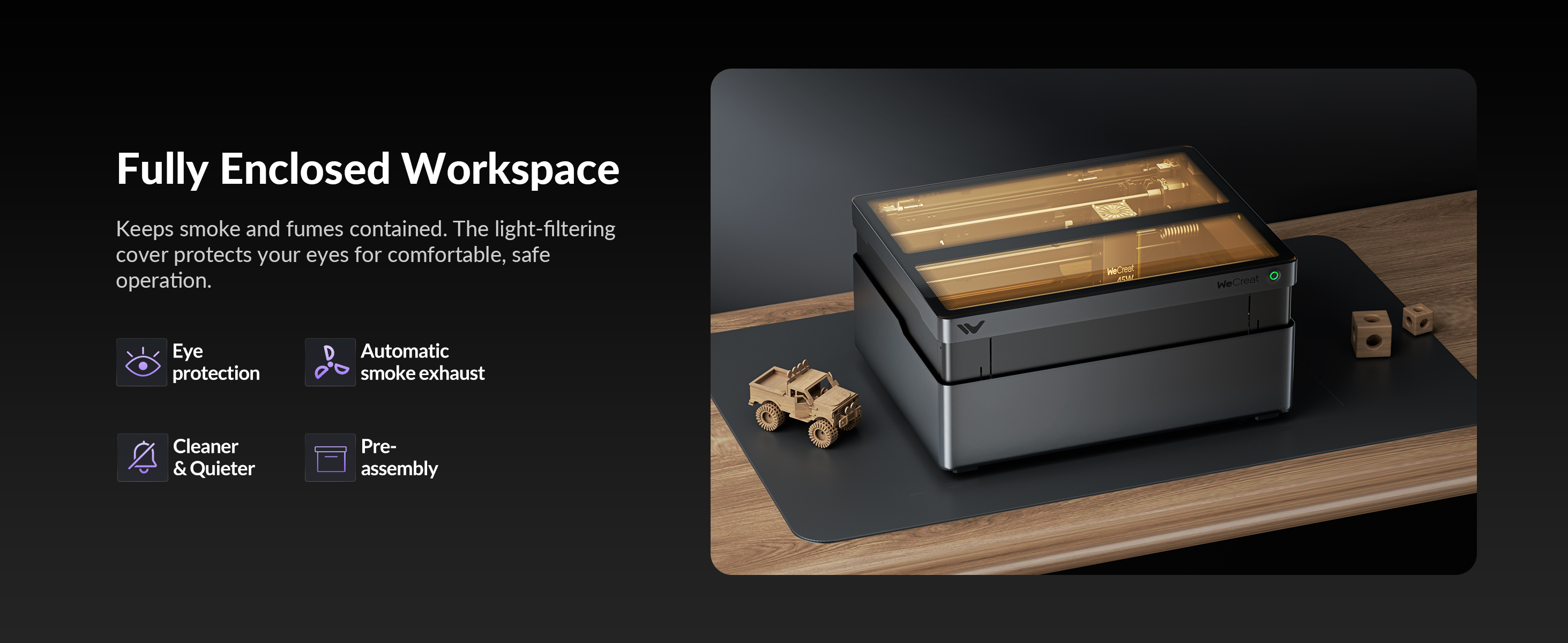
The Vision Pro combines an enclosed diode platform with camera positioning, autofocus and automatic lifting. These are manufacturer-documented setup features, not a promise of a particular cut quality or production rate.
This review covers the Amazon US Super option. We have not operated the machine. Our recommendation is conditional on the seller confirming the accessories and on the setup matching your materials, space and budget.
See our sources and evidence limitsFinal Verdict
Consider the Vision Pro 45W Super if you have defined projects, a workable extraction plan and written confirmation of the Amazon bundle. If you need predictable production output, request a demonstration before buying. The 3.8/5 editorial score reflects its documented setup features alongside the remaining evidence and purchase-configuration gaps.
What We Liked
- Camera positioning, autofocus and automatic lifting are documented
- Enclosed desktop design supports a planned workshop layout
- Accessory options can suit different project types
What Could Be Better
- Super bundle contents need itemized confirmation
- Cut quality, throughput and alignment are not independently measured here
- Extraction and consumables increase total setup cost
- Manufacturer graphics give conflicting work-area dimensions
Key Specs
- Platform
- Vision Pro 45W diode laser (manufacturer specification)
- Purchase option
- Super; confirm itemized contents with seller
- Positioning
- Integrated camera and autofocus (manufacturer documentation)
- Height adjustment
- Automatic lifting (manufacturer documentation)
- Software
- WeCreat MakeIt!; confirm LightBurn workflow and requirements
- Connection
- USB / Wi-Fi (manufacturer manual)
- Work area
- Confirm usable processing area; supplied graphics contain conflicting dimensions
- Accessories
- IR module, rotary, feeder and extractor inclusion must be verified
- Exhaust
- Follow the manual for hose installation and extraction arrangements
Confirm what “Super” includes
Vision Pro bundles differ across channels, so a direct-store package does not establish what ships with the Amazon Super listing. Get an itemized list with accessory model numbers. In particular, confirm the rotary version, any additional laser module, feeder and extractor. Compare that list with your actual jobs before paying for a larger package.
Judge the workflow, not just 45W
The advertised laser rating is not a controlled comparison of cutting quality or production speed. Define your material, thickness, design size and finish first. If repeatable output matters, request a demonstration using a representative file and material, including setup and cleanup time. We do not treat brand-supplied competitor charts as independent benchmarks.
Camera and autofocus: useful, not infallible
WeCreat documents camera positioning, autofocus and automatic lifting. These may simplify setup, but the documentation does not tell us how accurately your own designs will align. Plan trial pieces, a repeatable reference design and fixtures for batch work. Confirm placement again after changing material or restarting a job.
Check the usable work area
WeCreat-supplied graphics show conflicting work-area dimensions. Rather than publish one as a guaranteed limit, we recommend confirming the usable area for the exact configuration and any restrictions from rotary equipment, fixtures or taller objects. If your project barely fits, obtain a demonstration before ordering. A feeder changes the workflow and should be evaluated separately.
Plan extraction and maintenance
An enclosure does not replace a suitable exhaust arrangement. The manufacturer manual describes an exhaust hose and routing or extraction options; follow its full safety and operating instructions. Include filters where applicable, cleaning, inspection and material restrictions in your setup plan. Pickora has not measured fumes, noise or filtration efficiency.
Will it pay for itself?
For a small business, estimate contribution per finished order after blanks, waste, finishing, packaging and other variable costs. Divide the total setup cost by that contribution to estimate the number of orders needed to recover the investment, then account for labor and downtime. Do not base a sales forecast on unverified production rates or unused bundle accessories.
Buying Decision
Before buying, confirm four things in writing: (1) the exact Super bundle and accessory versions, (2) usable area for your largest design, (3) material compatibility for your projects, and (4) the extraction setup you can install. Compare the all-in cost with your budget. If the seller cannot clarify the contents or dimensions, hold off.
Who Should Buy It
- You can identify the materials and design sizes you intend to process.
- You value guided setup features and will still budget time for calibration and material trials.
- You have a suitable workspace and want to compare the full installed cost.
Who Should Skip It
- You need proven throughput for a deadline. Request a demonstration using your material and file, including setup and cleanup time, before committing.
- You only have occasional engraving jobs. Compare a local fabrication service against the total ownership cost before buying equipment.
- You need a guaranteed metal-processing solution. Confirm the exact metal, process and module with the manufacturer; do not infer capability from the bundle name.
Value and Tradeoffs
Compare complete working setups, not bundle names alone. Budget for extraction, filters where needed, fixtures, consumables, software and practice material. Extra accessories add value only when you will actually use them. The Amazon price and package availability can change; check the current listing rather than treating a supplied reference price as a live offer.
How Pickora Scored It
Final score = Σ (criterion score × weight ÷ 100), rounded to one decimal. These are research-based editorial judgments on a 1–5 scale, not laboratory measurements or customer-review averages. The evidence actually used is identified below. Weights total 100%.
Camera, autofocus and lifting address setup tasks, but their practical accuracy is not measured here.
Optional accessories broaden the platform; package contents and material suitability still need confirmation.
A complete workspace requires extraction planning, consumables and ongoing care.
Unresolved package and dimension questions limit confidence in a purchase based solely on promotional material.
Learn more about Pickora's research-based rating process.
Sources and Research
The sources below identify the evidence used for this article. Manufacturer specifications are distinguished from Pickora's editorial conclusions. No direct product testing or verified-buyer research is implied unless explicitly documented.
Vision Pro official product and package overview
WeCreat · Manufacturer documentation
Manufacturer platform features and package distinctions. Direct-store offers do not establish Amazon package contents or independently measured results.
Read manufacturer sourceVision Pro 45W user manual
WeCreat · Manufacturer documentation
Hardware identification, software setup, USB and Wi-Fi connections, exhaust installation and operating instructions. Read the full manual before use.
Read manufacturer sourceVision Pro support and beginner guides
WeCreat · Manufacturer documentation
Manufacturer guidance index for camera calibration, material trials and software workflows; not independent testing.
Read manufacturer source
Frequently Asked Questions
Check the exact Amazon listing and ask the seller for an itemized parts list, including rotary model, laser modules, feeder and extraction equipment.
Related Topics
- #Laser Engraving
- #Desktop Fabrication
Reviewed by Pickora
Independent, research-based tech reviews with no sponsored rankings. Published Oct 22, 2026.